



You’ve just finished a clean white desk setup: white keyboard, white monitor arm, a neat bit of cable management. Then you drop in a black mouse, and it sticks out like a bin bag on a wedding cake. Fair enough if that bugs you, because a white wireless gaming mouse is now easy to find and often cheap.
Finding a white wireless mouse that fits well and provides excellent performance is no easy task. This article reviews seven white wireless mice sold on Amazon UK, covers their specifications and examines what’s not mentioned in the product description. Note that I haven’t tried any of these products yet, and as such, you should take this information just as research, not a product review.
Best White Wireless Gaming Mice in 2026 at a Glance
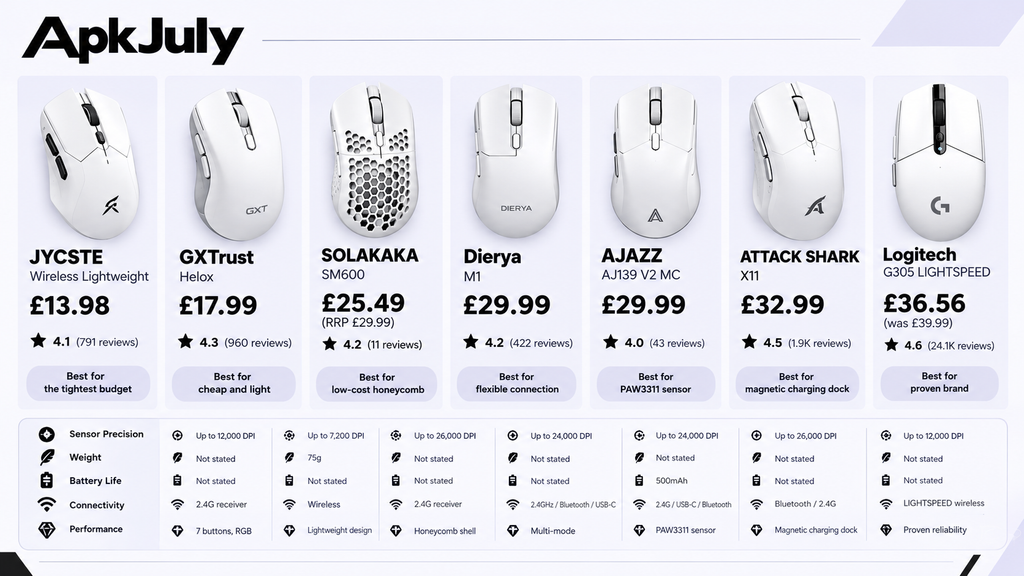
Every mouse below costs under £35, so budget isn’t the problem. Quality and fit are. The table uses only what each listing shows, seen on 25 October 2026.
| Mouse | Price | Rating | Connectivity (per listing) | Weight | Best for |
| JYCSTE Wireless Lightweight | £13.98 | 4.1 (791) | 2.4G receiver | Not stated | Tightest budget |
| GXTrust Helox | £17.99 | 4.3 (960) | Wireless | 75g | Cheap and light |
| SOLAKAKA SM600 | £25.49 (RRP £29.99) | 4.2 (11) | 2.4G receiver | Not stated | Low-cost honeycomb |
| Dierya M1 | £29.99 | 4.2 (422) | 2.4GHz, Bluetooth, USB-C | Not stated | Flexible connection |
| AJAZZ AJ139 V2 MC | £29.99 | 4.0 (43) | 2.4G, USB-C, Bluetooth | Not stated | PAW3311 sensor, 500mAh |
| ATTACK SHARK X11 | £32.99 | 4.5 (1.9K) | Bluetooth, 2.4G | Not stated | Magnetic charging dock |
| Logitech G305 LIGHTSPEED | £36.56 (was £39.99) | 4.6 (24.1K) | LIGHTSPEED wireless | Not stated | Best overall, proven brand |
Review counts are in brackets. One listing, the SOLAKAKA SM600, was sponsored, which means paid placement on Amazon UK, not a recommendation.
My picks, from the listing evidence alone:
- Best overall: Logitech G305, with the highest rating on by far the most reviews
- Best budget: JYCSTE, the cheapest by a distance
- Best value: Attack Shark X11, with a dock and a named sensor for under £33
- Competitive FPS: the X11 and AJAZZ, the two naming a PixArt PAW3311 sensor
Best White Wireless Gaming Mice for Every Budget
Seven mice, one clear leader on evidence. Here’s how each one stacks up.
Best Overall: Logitech G305 LIGHTSPEED
The G305 has the price of £36.56 and an average rating of 4.6 stars from 24,100 reviews and selling 1,000+ examples within the previous month. That is quite the amount for a gaming mouse. Logitech uses LIGHTSPEED, which refers to their own wireless 2.4GHz technology.
The advertisement does not provide any information about weight or dimensions, however it features a solid body construction that helps keep the dust away. As for the pricing, it is slightly overpriced compared to the honeycomb gaming mice.
Best Value: ATTACK SHARK X11
The X11 costs £32.99 with 4.5 stars from 1,900 reviews. It lists a PixArt PAW3311 sensor, Bluetooth and 2.4G wireless, and comes with a magnetic charging dock with RGB lighting. For the best white mouse bluetooth gaming fans want without paying much, it’s a strong candidate.
The catch is the missing weight and battery figures. Check the manufacturer’s page before buying.
Best for Flexibility: Dierya M1
The Dierya M1 costs £29.99, rated 4.2 from 422 reviews. It lists 24,000 DPI and three connection modes: 2.4GHz, Bluetooth and USB-C. It has a honeycomb shell and RGB underglow.
That 24,000 DPI figure is a marketing number. It tells you the sensor’s ceiling, not how well it tracks.
AJAZZ AJ139 V2 MC
The AJAZZ AJ139 V2 MC costs £29.99, rated 4.0 from 43 reviews, with 100+ bought last month. It is named the PAW3311 sensor, 24K DPI, a 500mAh battery and 2.4G, USB-C and Bluetooth connections. The dock shown in the listing photos is a nice touch.
Fewer reviews mean more uncertainty than the X11 carries.
SOLAKAKA SM600
Currently, the SM600 is priced at £25.49 (RRP £29.99) and has a rating of 4.2 out of 5 from only 11 reviews. Having honeycomb body and RGB lights, the rating should be interpreted carefully, because 11 reviews may change quickly.
GXTrust Helox: Best Budget Weight Spec
The GXTrust Helox is the only listing that states a weight, 75g, at £17.99 with 4.3 stars from 960 reviews. For a white lightweight wireless gaming mouse on a tight budget, that’s useful. Whether 75g actually suits you depends on shape.
JYCSTE: Cheapest of All
JYCSTE costs £13.98, rated 4.1 from 791 reviews, with a seven-button layout and RGB lighting. It’s the cheapest white option here. A low price usually means compromises, and the listing doesn’t say what they are.
How to Choose the Right White Wireless Gaming Mouse?
Weight, shape, sensor and connection matter most. A white shell is the easy part.
DPI and Sensor Performance
DPI represents how many dots your mouse moves for a given movement of your hand in inches. The higher this maximum, the better is not necessarily true. Most players maintain a few hundreds to a few thousand DPI, which means that a maximum of 24000 is usually required to obtain the big number on the package.
Weight, Shape and Grip Style
Lightweight mice move with less effort, but very light shells can feel flimsy. Grip matters too: palm grip rests your hand on the mouse, claw grip arches your fingers, and fingertip grip uses just your fingertips.
None of these listings give dimensions, so I can’t recommend the best white gaming mouse for claw grip or the best white mouse for small hands with confidence. Look up the manufacturer’s measurements first.
Wireless Connectivity and Latency
For gaming purposes, 2.4GHz wireless is often praised for its efficient USB receiver. Bluetooth technology is an advantageous option since no receiver is needed but this usually makes the Bluetooth connection less responsive. There are technologies that allow the user to take advantage of both of these wireless options – to game with 2.4GHz connection and then to switch to Bluetooth when using a laptop.
Battery Life and Charging
The stated battery life is merely an estimate given by the manufacturer. Features such as RGB lighting and high polling rates may cause the battery to deplete faster than anticipated. AJAZZ claims that their mouse has a battery with a capacity of 500mAh, whereas the rest have no information about their size.
Programmable Buttons and Gaming Software
FPS players rarely need many buttons, while MMO players do. JYCSTE advertises seven buttons. Check whether a mouse has software support before you buy.
Best White Wireless Gaming Mouse by Budget
Best Options Under £50
All seven qualify, so a white gaming mouse under £50 is easy to find. For the best cheap white wireless gaming mouse, the GXTrust Helox (£17.99) and JYCSTE (£13.98) cost the least. The G305 and X11 cost more but have far stronger evidence.
Best Options Between £50 and £100
None of my seven listings sits here. A step up usually buys lighter shells and better wireless, but I couldn’t verify specific UK models at this price.
Best Premium Options Above £100
Also none. Premium mice add refined shapes and sensors, but the case for spending triple the G305’s price is weaker unless you play competitively.
Which Types of White Wireless Mouse Compare Best?
Logitech G305 vs ATTACK SHARK X11
The G305 has the track record: 24,100 reviews. The X11 adds Bluetooth, a named PAW3311 sensor and a dock for £3.57 less. Choose the G305 for reliability and the X11 for features.
Wireless vs Wired Gaming Mice
Modern wireless mouses for gaming are close enough to be wired for most players. Wired mice never need charging and cost less. Wireless frees up your desk. Pick wireless if cable drag annoys you.
Lightweight vs Ergonomic Gaming Mice
Lightweight mice, like the GXTrust Helox at 75g, move quickly. Heavier ergonomic mice often support your hand better over long sessions. For the best white mouse for fps games, many players prefer lighter shells. I haven’t tested any of these, so check reviews for comfort.
How Do You Keep a White Gaming Mouse Clean?
Wipe it regularly, and avoid soaking it. White plastic shows grime sooner than black.
Do White Gaming Mice Turn Yellow?
Some do, over time. Skin oils, sunlight and ageing plastic can cause discolouration, though not every mouse yellows.
How to Clean a White Gaming Mouse Safely?
Disconnect it or turn it off, and clean using a slightly damp microfibre towel. Rubbing a cloth with some isopropyl alcohol disinfects problematic stains. Never use harsh chemicals and avoid pouring liquid on it.
Honeycomb casings such as Dierya and JYCSTE may let dust enter. You should use a gentle brush or compressed air.
How to Prevent Dirt and Stains?
Wash your hands before long sessions, wipe the mouse weekly, and store it away from sunlight.
What Mistakes Should You Avoid?
- Buying on maximum DPI alone
- Assuming the lightest mouse is best
- Ignoring hand size and grip
- Overlooking battery and charging
- Paying for features you won’t use
- Treating battery claims as guarantees
- Assuming every colour has identical specs
- Ignoring returns and warranty
Frequently Asked Questions
What Is the Best White Wireless Gaming Mouse in 2026?
From these seven, the Logitech G305 is the strongest on evidence: £36.56, 4.6 stars from 24,100 reviews. It’s the best white wireless gaming mouse here for most players, though I haven’t tested it.
Are White Wireless Gaming Mice as Good as Black Ones?
Yes. Performance depends on the sensor, shape and wireless hardware, not colour. Just confirm the white version has identical specs.
Do Wireless Gaming Mice Perform on Par with Wired Mice?
The new wireless technology for today’s gamers is almost as good as the wired version. However, Bluetooth connection tends to have a little delay compared to 2.4 GHz.
What is the Optimal DPI for Gaming?
There is no one right answer. Players prefer to use anywhere between several hundred and several thousand DPI depending on their likes and specific game.
Do White Gaming Mice Become Yellow?
Some people report that their white mice become discolored because of dirt, sunlight, and natural factors.
Conclusion
Start with the Logitech G305 for a proven choice, or the Attack Shark X11 for more features. Go to the JYCSTE or GXTrust Helox if the budget comes first. Whatever you pick, check dimensions, battery and returns before you order, since none of these listings tells the whole story.
That’s the quickest route to the best white wireless gaming mouse for your setup. For more help, browse APKJuly’s gaming and technology guides, including the best sniper games for PC if you want somewhere to try an FPS mouse, and the guides to a gaming laptop around £500 and around £800 for the rest of your setup.