


Picture a gamer who spends £90 on a monitor boasting “240Hz”, then wonders why fast shooters still look smeary. The box made a promise. The panel couldn’t keep it. That gap between marketing and reality is why finding the best budget gaming monitor UK buyers can trust takes a little homework.
Four specs do most of the heavy lifting: refresh rate (how often the picture updates each second), resolution (sharpness), response time (how fast pixels change colour) and panel type. This guide sticks to monitors you can buy for £150 or less. Pricier upgrades appear only where they genuinely help.
One caution before we start. Prices below come from Amazon UK listings checked on 26 October 2026, and they shift often. I haven’t tested these monitors myself, so the picks rest on listed specifications and customer ratings.
Best Budget Gaming Monitors in the UK at a Glance
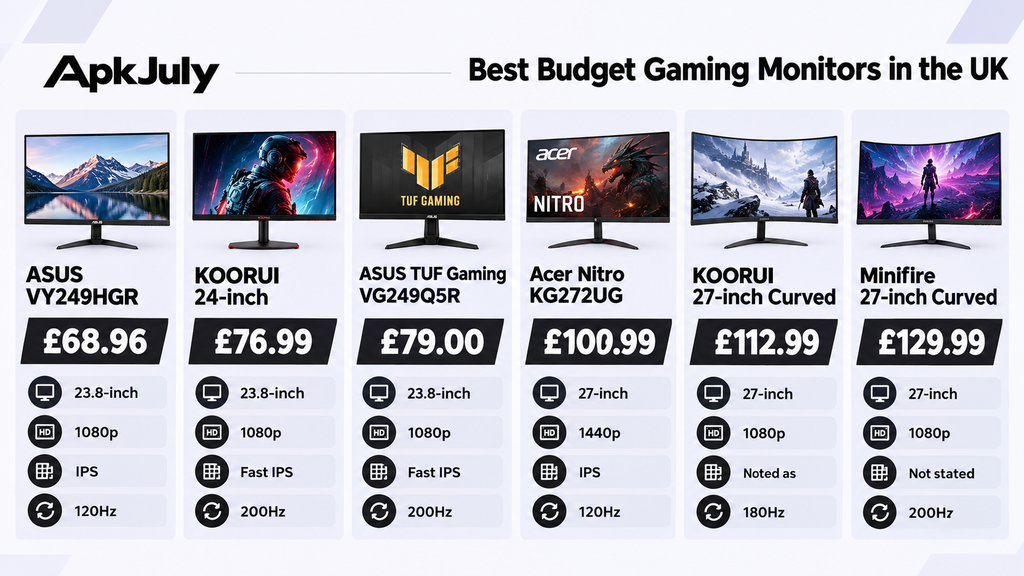
| Model | Price | Size | Resolution | Panel | Refresh rate | Best for |
| ASUS VY249HGR | £68.96 | 23.8″ | 1080p | IPS | 120Hz | Under £100 |
| KOORUI 24″ (HDR400 listing) | £76.99 | 23.8″ | 1080p | Fast IPS | 200Hz | Budget speed |
| ASUS TUF Gaming VG249Q5R | £79.00 | 23.8″ | 1080p | Fast IPS | 200Hz | Best overall |
| acer Nitro KG272UG | £109.99 | 27″ | 1440p | IPS | 120Hz | Best 27-inch |
| KOORUI 27″ Curved | £112.99 | 27″ | 1080p | Not stated | 180Hz | Cheap big screen |
| Minifire 27″ Curved | £129.99 | 27″ | 1080p | Not stated | 200Hz | Fast 27-inch |
Every model here costs £150 or less, including a 1440p option.
Best Budget Gaming Monitors in the UK
Best Overall Gaming Monitor Under £150
The ASUS TUF Gaming VG249Q5R, available for £79, tops the list. It features a 200Hz Fast IPS panel with a nominally 0.3ms GtG response time, FreeSync Premium, and both HDMI and DisplayPort. It earns an admirable 4.5 stars in 309 reviews. The emphasis here is on value; the performance usually requires a higher price but you end up saving £70.
Is there a catch? It is 1080p resolution, so the text and intricate details won’t look as sharp as on a 1440p screen. That being said, this monitor boasts HDR10 compatibility, but it’s not really worth focusing on.
Best Gaming Monitor Under £100
The ASUS VY249HGR costs £68.96 (reduced from £89 on the listing). It offers a 24-inch IPS panel, 120Hz (overclocked), adaptive sync and a 1ms MPRT figure. Over 1,600 buyers rate it 4.3 stars.
That’s the cheapest respectable entry point we found. The best gaming monitor under £100 compromises on top-end speed, stand adjustability and ports. Expect a tilt-only stand and basic connectivity. For a first monitor, those trade-offs hurt less than you’d think.
Best 24-Inch Gaming Monitor for Budget Buyers
The TUF wins here as well. A best 24 inch gaming monitor UK shortlist makes sense for most desks because 1080p at 24 inches looks sharp enough, and your eyes can take in the whole screen without constant head movement.
That matters in competitive games, where you glance at minimaps and health bars. It also keeps GPU demands low, so frame rates stay high on modest hardware.
Best 27-Inch Budget Gaming Monitor
The Acer Nitro KG272UG (£109.99) is the pick. It packs a 27-inch 1440p IPS panel, 120Hz, adaptive sync, DisplayPort and HDMI into a budget price. That’s the best 27 inch budget gaming monitor combination here, because 1440p keeps text and detail crisp at this size.
Two caveats. Only 16 buyers have rated it (3.8 stars), so the sample is small. And the listing shows 1ms in its title but 4ms in its spec summary, so treat response time as unconfirmed.
Prefer pure speed? The Minifire 27-inch curved (£129.99, 200Hz, 1080p) has 3,300 ratings averaging 4.4 stars. The KOORUI 27-inch curved (£112.99, 180Hz, 1080p) costs less. Both stretch 1080p across 27 inches, which softens the picture if you sit close.
Whatever you choose, match resolution to your graphics card. A weak GPU will waste the extra pixels of 1440p. If you’re still weighing up hardware, our guide to gaming laptops around £800 in the UK shows what that budget buys.
Best Budget IPS Gaming Monitor
For the best budget IPS gaming monitor, choose the TUF or the ASUS VY249HGR. IPS panels offer stronger colours and wider viewing angles than most VA alternatives, so the image stays consistent when friends crowd around your desk.
Don’t assume the panel type guarantees quality, though. Two IPS monitors can behave very differently in motion, depending on tuning and overdrive settings.
Best Budget Gaming Monitor for FPS Games
The best budget gaming monitor for FPS play is the TUF again, with the KOORUI 24-inch (£76.99, 200Hz) a close second. Motion clarity, input lag and refresh rate matter most in shooters.
A well-tuned 144Hz or 180Hz screen can beat a poorly tuned 240Hz one. Advertised numbers describe the best case, not everyday behaviour. Check independent measurements before trusting a bold claim.
Best Gaming Monitor for PS5 in the UK
The best gaming monitor for PS5 UK buyers must accept 120Hz over HDMI. The PS5 tops out at 120Hz, so a 200Hz panel gives you nothing extra on the console.
Before buying, confirm three things:
- The monitor supports 120Hz at 1080p through its HDMI port.
- It offers HDMI 2.1 if you want variable refresh rate on PS5.
- The manual explains which input handles the highest refresh rate.
The ASUS VY249HGR advertises 120Hz, which suits PS5 on paper. Verify the HDMI details with ASUS before you order.
What to Look for in a Budget Gaming Monitor?
1080p vs 1440p: Which Resolution Is Better?
1440p is sharper, but 1080p is a better value under £150. At 24 inches, the difference is modest. At 27 inches, 1440p looks noticeably cleaner. A best 1440p gaming monitor UK search also demands a stronger graphics card.
144Hz vs 180Hz vs 240Hz
Higher refresh rates look smoother, but the gains shrink fast. Jumping from 60Hz to 144Hz is dramatic. Going from 144Hz to 240Hz is subtle, and you need a PC capable of feeding it frames.
IPS vs VA Panels
IPS wins on colour and viewing angles. VA wins on contrast and deeper blacks, though dark scenes can smear on cheaper models. Response behaviour varies by individual monitor, so read independent reviews.
Response Time, Input Lag and Ghosting
- Response time: how quickly a pixel changes colour.
- Input lag: the delay between your click and the screen reacting.
- Ghosting: faint trails behind moving objects.
A “1ms” label doesn’t guarantee clean motion. Manufacturers often measure under flattering conditions.
FreeSync, G-Sync Compatibility and HDR
Adaptive sync allows the refresh rate of the screen to match the output from the GPU, preventing tearing. FreeSync monitors are compatible with Nvidia graphics cards as well. The HDR feature present on affordable screens underperformed because the units lack necessary levels of brightness and local dimming.
HDMI vs DisplayPort
DisplayPort usually handles high refresh rates on PCs more reliably. HDMI is fine for consoles. Check the monitor, the cable and your device, because any weak link caps the result.
Best Gaming Monitors by Budget: What Should You Expect?
Gaming Monitors Under £100
Expect 1080p, 100Hz to 200Hz, and basic stands. The best cheap gaming monitor UK options sit here, and our ASUS VY249HGR proves you can get IPS for under £70.
Gaming Monitors Under £150
This is where our recommendations live. High-refresh 1080p models dominate, but the Acer Nitro proves 1440p now fits too. The best gaming monitor under 150 UK is still the TUF for speed, and the acer for sharpness.
Gaming Monitors Under £200
Stretching to £200 can add faster 1440p refresh rates or sturdier stands. I haven’t verified a specific model at this price, so check current listings. For the best gaming monitor under 200 UK buyers can confirm today, our sub-£150 picks leave plenty of change.
Gaming Monitors Under £300
Expect better 1440p panels, height-adjustable stands and stronger motion handling. The jump in build quality is real.
Gaming Monitors Under £400
Higher-refresh 1440p monitors with improved colour and faster response appear. They suit buyers who want a long-term upgrade.
Gaming Monitors Under £500
Premium 1440p and selected 4K models arrive. These are upgrade alternatives, not picks for a £150 budget. I haven’t verified specific models at this price.
Are 4K Gaming Monitors Worth It on a Budget?
Rarely. 4K means roughly 8.3 million pixels, against about 3.7 million at 1440p. Your graphics card must render all of them, which demands serious hardware.
A new 4K gaming monitor also doesn’t fit a £150 budget. If you want the best budget 4K gaming monitor UK result, budget more and match it with a powerful GPU. For everyone else, a high-refresh 1080p or 1440p screen delivers more fun per pound.
How to Choose the Right Monitor for Your Gaming Needs?
Beginners: Prioritise refresh rate and IPS quality over flashy labels. The best gaming monitor for beginners UK buyers need is simple: 24 inches, 1080p, 144Hz or higher.
Competitive gamers: Pick a 24-inch screen with 180Hz or more, low input lag and clean motion.
Casual and everyday users: Look for decent colours, comfortable viewing and a reliable stand. IPS suits mixed use.
Low-end gaming PCs: Stay at 1080p. Your frame rate matters more than extra pixels, which is why budget machines like those in our best gaming laptops around £500 guide pair well with a 1080p screen.
Common Mistakes to Avoid When Buying a Budget Gaming Monitor
- Deciding based solely on refresh rate.
- Believing 1ms means no ghosting.
- Purchasing high resolutions without having GPU support.
- Thinking all HDR labeled screen yields, great HDR outputs.
- Neglecting factors like ports, ergonomics, and warranties.
- Relying on outdated prices or untrusted discounts.
How to Check Your Gaming Monitor After Delivery?
Run these checks within your return window:
- To identify dead pixels, use your monitor to show black, white, red, green, and blue colors and check for any permanent dots.
- To identify backlight bleed, use your screen in a dark space. If you notice excessive lighting around the edges of the screen in the dark, then this is a problem.
- As for refresh rate, check your display settings to see if the monitor functions at the desired speed.
Check the return policy and warranty of the seller. Be sure to take pictures of the defect before the call for assistance.
Frequently Asked Questions
What Is the Best Budget Gaming Monitor in the UK in 2026?
According to the findings, the ASUS TUF Gaming VG249Q5R at £79.00 is the one that blends speed, monitor quality, and price in the best way.
What Is the Best Gaming Monitor Under £150?
It’s again the TUF. It leaves a budget cushion so you can buy a good cable or save the excess money.
Can I Get a 1440p Gaming Monitor Under £150?
Yes. The Acer Nitro KG272UG is priced at £109.99 at Amazon UK with 1440p, IPS, and 120Hz specifications. It is advisable to check up on recent feedback as its score is based on only 16 feedbacks.
Is 144Hz Enough for Gaming?
For most of the players, yes. While the gains are visible for professional gamers, they decrease for everyone else.
What Is the Best Gaming Monitor for PS5 in the UK?
Choose a monitor that will work with 120Hz via HDMI. The ASUS VY249HGR has 120Hz listed on it, so just make sure you read more about HDMI.
Conclusion
For £79, the ASUS TUF Gaming VG249Q5R is the best combination of speed, quality of the picture and value in this group. If you must spend less, the ASUS VY249HGR at £68.96 satisfies the basic needs. Buyers seeking a bigger and sharper screen may pay attention to the Acer Nitro KG272UG at £109.99. Those who go for 200Hz instead of resolution can think about the Minifire 27-inch priced at £129.99.
In order to achieve the best results, it would be wise to match the refresh rate& resolution& quality of the panel with your equipment, rather than choosing a box by its loud declarations.
Prices and specifications change quickly, so check the current listing before you buy. For more plain-English hardware guides and buying advice, keep exploring APKJuly. Your next monitor should make every game feel better, and it doesn’t need to cost much.