


Your phone hits 5% battery right as you beat your high score. Meanwhile, the laptop sits two feet away, fully charged and doing nothing. That’s the moment most people start searching for subway surfers for pc.
You can play the endless runner on a Windows laptop in India without paying a cent. This guide covers a clean subway surfers pc game free download setup through Google Play Games or an Android emulator. You’ll also get system requirements, keyboard controls and fixes for the usual headaches. Learning how to play subway surfers on pc takes about fifteen minutes.
Is Subway Surfers Available for PC?
Yes, though not as a classic Windows program. SYBO Games built the game for Android and iOS, so every PC route runs the Android version inside a compatibility layer.
Can You Play Subway Surfers on Windows 10 and Windows 11?
You can. Both subway surfers for windows 10 and subway surfers for windows 11 work with the methods below. It requires a recent build of Windows 10 or Windows 11. Emulators are more forgiving with older builds.
The catalogue of games available is also restricted. Google controls what is available on their PC version of Google Play Games and the games are region specific. The PC version was launched in India in July 2023 and Subway Surfers is currently listed officially in the Indian Google Play Games store. However, these listings can change. Always make sure that it is available to you personally.
What are the Ways to Play Subway Surfers on PC?
There are three ways:
- Install the official Google Play Games app on PC. This allows you to play supported Android games on your Windows device.
- Use an Android emulator, such as BlueStacks. This creates a virtual phone and can run nearly any Android app.
- Unofficial browser versions. These will have embedded old versions of the game but will run very slowly, will not be updated and will often be very ad heavy.
Is Subway Surfers Free to Download and Play?
It is. The game is free-to-play which means there is no initial cost to play. You will earn revenue through video adverts and by spending money on in-game items such as coins, keys and characters. In India there will be pricing in rupees. Usually payments can be made via UPI or Google Play Balance.You can ignore every purchase prompt and still enjoy the game.
Method 1 How to Play Subway Surfers Using Google Play Games
What Is Google Play Games on PC?
Google Play Games is a Windows app that runs supported Android games on your computer. You get official distribution, automatic updates and keyboard mapping built in.
The search for google play games for pc download should lead you to Google’s own site only.
Subway Surfers PC System Requirements
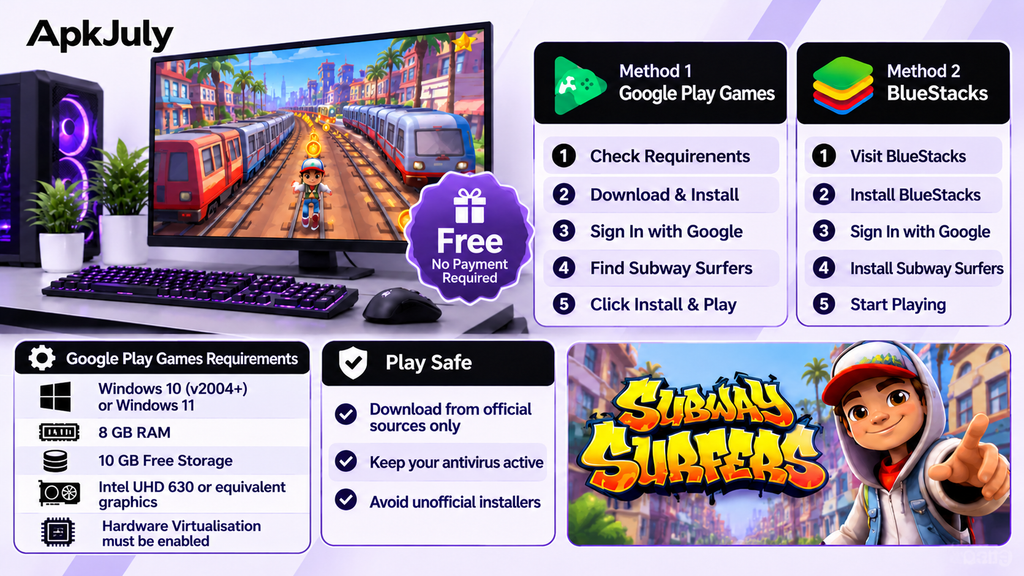
Google publishes its own specs, and they change. Here are the subway surfers pc system requirements as Google lists them on its Play Help page. Verify them on Google’s page before you commit.
| Component | Requirement |
| Windows version | Windows 10 (v2004 or later) or Windows 11 |
| RAM | 8 GB |
| Processor | 4 physical cores (8 logical cores recommended), plus a Windows admin account |
| Storage | SSD with 10 GB free |
| Graphics | Intel UHD 630 class or comparable GPU |
| Hardware virtualisation | Must be enabled in BIOS/UEFI |
How to Download and Install Subway Surfers Using Google Play Games?
Follow these steps for the subway surfers pc download:
- Visit the official Google Play Games website.
- Check whether Subway Surfers appears in the PC game list.
- Download Google Play Games.
- Run the installer and finish the setup.
- Sign in with your Google Account.
- Search for Subway Surfers.
- Click Install, then launch the game.
That’s the whole subway surfers pc game free download setup. No payment, no key, no registration beyond your Google login. Watch your data pack, though. Large installers eat into a daily mobile data limit, so use Wi-Fi when you can.
What If Subway Surfers Is Not Available in Google Play Games?
Start with the basics. Your region may lack the listing, your PC may fail the compatibility check, or your account country may differ from your location. Confirm virtualisation is on and update the Google Play Games app.
Still nothing? Switch to an emulator. That’s Method 2.
Method 2 How to Download Subway Surfers Using BlueStacks
This section also answers how to play android games on pc in general, since the same steps work for most mobile titles.
What Is BlueStacks?
BlueStacks is an Android emulator. It creates a virtual phone inside Windows, complete with its own Play Store.
Steps to Install Subway Surfers on PC Using BlueStacks
- Visit the official BlueStacks website.
- Download and install the emulator.
- Open the Google Play Store inside BlueStacks.
- Sign in with your Google Account.
- Search for Subway Surfers.
- Confirm SYBO Games as the publisher.
- Install and launch the game.
Is BlueStacks Suitable for Low-End Laptops?
Sometimes. BlueStacks lists 4 GB of RAM, any Intel or AMD processor and 5 GB of free storage as its minimum, which is lighter than Google’s demands. Subway Surfers is a simple game, so it runs on modest hardware.
Google Play Games vs BlueStacks. Which Is Better?
| Feature | Google Play Games | BlueStacks |
| Installation | Simple, official Google app | Larger download, more setup screens |
| Game availability | Limited, varies by region | Full Play Store access |
| System requirements | Higher | Lower |
| Keyboard controls | Preset mapping | Fully customisable |
| Compatibility | Stricter hardware checks | Works on more machines |
| Ease of use | Very easy | Easy, with more options |
Which Method Should You Choose?
Google Play Games If your PC has the necessary specifications and Subway Surfers is available in your region. This will give you a much cleaner and smoother experience.
BlueStacks If the game is not listed, your device is outdated or if you want custom key bindings. This will provide you with more flexibility.
How to Play Subway Surfers on PC With a Keyboard?
Subway Surfers Keyboard Controls
These subway surfers keyboard controls cover the usual defaults:
| Action | Keyboard key |
| Move left | Left arrow |
| Move right | Right arrow |
| Jump | Up arrow |
| Roll | Down arrow |
| Hoverboard | Configured key |
How to Change Keyboard Controls in BlueStacks?
- Open the control editor from the side toolbar.
- Review the existing key mappings.
- Click an action and assign a new key.
- Save, then test in a live run.
Can You Play Subway Surfers on a Low-End PC?
Can Subway Surfers Run on a Laptop With 4GB RAM?
For subway surfers on laptop hardware with 4 GB of RAM, Google Play Games won’t qualify. It asks for 8 GB. BlueStacks lists 4 GB as its minimum, so it can run, though it won’t feel fast.
That matters in India, where budget laptops with 4 GB RAM and a hard drive are common.
How to Improve Subway Surfers Performance?
- Close browsers and background apps.
- Lower the emulator’s resolution.
- Update your graphics drivers.
- Reduce the emulator’s graphics and performance settings.
- Enable hardware virtualisation in your BIOS or UEFI.
Can You Transfer Subway Surfers’ Progress From Mobile to PC?
Can I Use The Same Account On Both Devices?
Some versions allow you to sign-in using Google Play Games (Android) or Facebook. If you use a Google account on both your PC and phone you should be given an option to link your save.
Will My Coins, Characters & Progress Carry Over?
This won’t always happen. It depends on how you logged into Subway Surfers before. Guest accounts will only save the data on that one device so if you have a clean install on your PC you might have to start from scratch.
Common Subway Surfers PC Problems and How to Fix Them
Subway Surfers Not Showing on Google Play Games
Ensure you are viewing your Google Play Games by region. Ensure that your app is updated, your PC has the minimum spec requirements and try logging out and back in. If you still aren’t seeing the game install it using BlueStacks.
Not Installing Subway Surfers on PC
Clear some space on your hard drive, restart your PC. Ensure you’re logged into your Google Account and that there isn’t an update pending for the Play Store. Clearing the Play Store cache within BlueStacks will fix many issues where the game can’t be downloaded.
Subway Surfers Crashing on BlueStacks
Ensure that your BlueStacks is updated to the latest build. Increase the amount of RAM allocated in the settings. Try switching between DirectX and OpenGL for your graphics.
Keyboard Controls Are Not Working
Make sure you click on the game window and then open up the control editor again to make sure this is mapped. If it doesn’t work properly due to your custom controls, reset it back to default.
How to Check and Install the Subway Surfers Latest Version?
Where to Find the Latest Version?
Ensure that you are using an official source of Google Play. Within Google Play Games or the BlueStacks Play Store, navigate to the game page and click on the Update Button. You can also turn on automatic updates to ensure you always have the latest version of the game.The Subway Surfers latest version always lives there first.
Why Should You Avoid Unofficial PC Installers?
Because the risks outweigh the convenience. Third-party installers often carry modified files, bundled adware or real malware.
Plenty of free game and software download sites in India promise a one-click PC installer. Verify the publisher is SYBO Games, and ignore any site that asks you to disable antivirus. That request alone tells you everything.
Games Like Subway Surfers for PC
Want variety? Searching for games like Subway Surfers for pc.There are plenty of endless runner games available for you to play if you’re looking for Subway Surfers alternatives for pc. The obvious option will be to go with a Temple Run style game.
There are a few options available on Steam and Android emulators. Each will be different in terms of price, controls and ads, so be sure to check the store page. Additionally, SYBO have released a sequel called Subway Surfers City which is available for Windows via Google Play Games.
Frequently Asked Questions
Can I play Subway Surfers without BlueStacks?
Yes. Google Play Games is the main alternative, where available.
Can I transfer my mobile progress to PC?
Sometimes, if you link the same account on both devices. Guest progress usually stays on one device.
Is Subway Surfers available to play on PC in India?
Yes, you can download it via Google Play Games or an android emulator. However, there is no classic version for Windows, only an official version via Google Play Games.
Can I play Subway Surfers on my 4GB ram laptop?
Possibly using BlueStacks however it will be slow. Google Play Games will ask you for 8 GB of ram.
Can I download Subway Surfers from 3rd party websites safely?
No. It is best to download via Google Play Games. If using an emulator make sure it is a trusted one and that it says it is published by SYBO Games.
Conclusion
Two official-friendly routes exist. Start with Google Play Games when your hardware and region qualify. Go to BlueStacks if you can’t find it on the list or your laptop doesn’t meet the requirements.
No matter what you choose, ensure that the emulator is compatible with your device and only download from reliable sources.A solid subway surfers pc game free download setup costs you nothing but fifteen minutes.
APKJuly has plenty of free tutorials about how to play games on your PC and how to use emulators including free guides to games. So why not check out our range of tutorials to help you gain that high score on a larger screen!